This free fancy text generator turns your words into 52 copy-and-paste styles. Add a frame or symbols, make it yours, then copy.
/
18 / 1,000
Insert a symbol
Make it yours
Moonlight script
☾ ⋆ 𝒮𝓉𝒶𝓎 𝒶 𝓁𝒾𝓉𝓉𝓁ℯ 𝓌𝒾𝓁𝒹 ⋆ ☽
Decoration
Letter case
Pick Customize on any style in the library to edit it here. Frames work with any language.
Moonlight script
☾ ⋆ 𝒮𝓉𝒶𝓎 𝒶 𝓁𝒾𝓉𝓉𝓁ℯ 𝓌𝒾𝓁𝒹 ⋆ ☽
Butterfly
ʚɞ ⁺˖ 𝒮𝓉𝒶𝓎 𝒶 𝓁𝒾𝓉𝓉𝓁ℯ 𝓌𝒾𝓁𝒹 ˖⁺ ʚɞ
Ribbon & lace
୨୧ ⋆ 𝓢𝓽𝓪𝔂 𝓪 𝓵𝓲𝓽𝓽𝓵𝓮 𝔀𝓲𝓵𝓭 ⋆ ୨୧
Royal name
♛ 𝕾𝖙𝖆𝖞 𝖆 𝖑𝖎𝖙𝖙𝖑𝖊 𝖜𝖎𝖑𝖉 ♛
Stardust
✧・゚: 𝓢𝓽𝓪𝔂 𝓪 𝓵𝓲𝓽𝓽𝓵𝓮 𝔀𝓲𝓵𝓭 :・゚✧
Flower garden
✿ ❀ 𝒮𝓉𝒶𝓎 𝒶 𝓁𝒾𝓉𝓉𝓁ℯ 𝓌𝒾𝓁𝒹 ❀ ✿
Editorial
— 𝑆𝑡𝑎𝑦 𝑎 𝑙𝑖𝑡𝑡𝑙𝑒 𝑤𝑖𝑙𝑑 —
Bold cursive
𝓢𝓽𝓪𝔂 𝓪 𝓵𝓲𝓽𝓽𝓵𝓮 𝔀𝓲𝓵𝓭
Bold
𝐒𝐭𝐚𝐲 𝐚 𝐥𝐢𝐭𝐭𝐥𝐞 𝐰𝐢𝐥𝐝
Italic
𝑆𝑡𝑎𝑦 𝑎 𝑙𝑖𝑡𝑡𝑙𝑒 𝑤𝑖𝑙𝑑
Bold italic
𝑺𝒕𝒂𝒚 𝒂 𝒍𝒊𝒕𝒕𝒍𝒆 𝒘𝒊𝒍𝒅
Cursive
𝒮𝓉𝒶𝓎 𝒶 𝓁𝒾𝓉𝓉𝓁ℯ 𝓌𝒾𝓁𝒹
What is a fancy text generator?
A fancy text generator swaps the letters you type for look-alike Unicode characters, such as script, bold, gothic or bubble letters, so the style survives copy and paste. There is no font to install: the characters themselves carry the look.
Write and customize on the left; browse and copy the styles on the right.
52 styles in six moods. Cute, Celestial, Gaming, Minimal, Classic and Decorative. Every style previews your words as you type.
Any style, made yours. Pick one of 9 frames or write your own, switch the letter case and add airy spacing between characters.
Symbols where you need them. Insert stars, hearts, flowers, moons and kaomoji at your cursor from a picker of about 130 symbols.
Private by design. This fancy text generator runs in your browser. Your words are never uploaded or stored; only the names of favorite and recent styles stay on your device.
Same words, a different character
Because a fancy text generator outputs characters rather than formatting, the style goes with your text wherever you paste it.
What you type
Make room for good ideas.
What you can paste
Bold𝐌𝐚𝐤𝐞 𝐫𝐨𝐨𝐦 𝐟𝐨𝐫 𝐠𝐨𝐨𝐝 𝐢𝐝𝐞𝐚𝐬.
Cursiveℳ𝒶𝓀ℯ 𝓇ℴℴ𝓂 𝒻ℴ𝓇 ℊℴℴ𝒹 𝒾𝒹ℯ𝒶𝓈.
Moonlight script☾ ⋆ ℳ𝒶𝓀ℯ 𝓇ℴℴ𝓂 𝒻ℴ𝓇 ℊℴℴ𝒹 𝒾𝒹ℯ𝒶𝓈. ⋆ ☽
Royal name♛ 𝕸𝖆𝖐𝖊 𝖗𝖔𝖔𝖒 𝖋𝖔𝖗 𝖌𝖔𝖔𝖉 𝖎𝖉𝖊𝖆𝖘. ♛
52 fancy text styles, sorted by mood
Every sample below comes straight from the fancy text generator above. Find a mood you like, then try the same style with your own words.
Cute
8 styles
Butterflies, ribbons, hearts and flowers for soft, aesthetic bios.
Butterflyʚɞ ⁺˖ 𝒢ℴℴ𝒹 𝓋𝒾𝒷ℯ𝓈 ℴ𝓃𝓁𝓎 ˖⁺ ʚɞ
Ribbon & lace୨୧ ⋆ 𝓖𝓸𝓸𝓭 𝓿𝓲𝓫𝓮𝓼 𝓸𝓷𝓵𝔂 ⋆ ୨୧
Flower garden✿ ❀ 𝒢ℴℴ𝒹 𝓋𝒾𝒷ℯ𝓈 ℴ𝓃𝓁𝓎 ❀ ✿
Also in Cute: Love letter, Cloud nine, Bunny ears, Pearl necklace, Heart note
Celestial
6 styles
Moons, stars and sparkles for a dreamy, night-sky feel.
Moonlight script☾ ⋆ 𝒢ℴℴ𝒹 𝓋𝒾𝒷ℯ𝓈 ℴ𝓃𝓁𝓎 ⋆ ☽
Stardust✧・゚: 𝓖𝓸𝓸𝓭 𝓿𝓲𝓫𝓮𝓼 𝓸𝓷𝓵𝔂 :・゚✧
Constellation⋆。°✩ 𝖦𝗈𝗈𝖽 𝗏𝗂𝖻𝖾𝗌 𝗈𝗇𝗅𝗒 ✩°。⋆
Also in Celestial: Orbit, Night sky, Solar flare
Gaming
7 styles
Crowns, blades and gothic banners for nicknames and clan tags.
Royal name♛ 𝕲𝖔𝖔𝖉 𝖛𝖎𝖇𝖊𝖘 𝖔𝖓𝖑𝖞 ♛
Blade乂 𝗚𝗼𝗼𝗱 𝘃𝗶𝗯𝗲𝘀 𝗼𝗻𝗹𝘆 乂
Guild banner༺ 𝔊𝔬𝔬𝔡 𝔳𝔦𝔟𝔢𝔰 𝔬𝔫𝔩𝔶 ༻
Also in Gaming: Boss tag, Arcade, Diamond rank, Dark rose
Minimal
8 styles
Clean lines and quiet accents for captions and headings.
Editorial— 𝐺𝑜𝑜𝑑 𝑣𝑖𝑏𝑒𝑠 𝑜𝑛𝑙𝑦 —
Fine line── 𝖦𝗈𝗈𝖽 𝗏𝗂𝖻𝖾𝗌 𝗈𝗇𝗅𝗒 ──
Quoted❝ 𝒢ℴℴ𝒹 𝓋𝒾𝒷ℯ𝓈 ℴ𝓃𝓁𝓎 ❞
Also in Minimal: Airy letters, Dot note, Angle brackets, Botanical, Little spark
Classic
16 styles
The Unicode letter styles: bold, italic, cursive, gothic, monospace and more.
Bold𝐆𝐨𝐨𝐝 𝐯𝐢𝐛𝐞𝐬 𝐨𝐧𝐥𝐲
Cursive𝒢ℴℴ𝒹 𝓋𝒾𝒷ℯ𝓈 ℴ𝓃𝓁𝓎
Gothic𝔊𝔬𝔬𝔡 𝔳𝔦𝔟𝔢𝔰 𝔬𝔫𝔩𝔶
Also in Classic: Italic, Bold italic, Bold cursive, Bold gothic, Double-struck, Sans serif, Sans bold, Sans italic, Sans bold italic, Monospace, Small caps, Underlined, Strikethrough
Decorative
7 styles
Circled, squared and fullwidth letters, plus simple frames.
CircledⒼⓞⓞⓓ ⓥⓘⓑⓔⓢ ⓞⓝⓛⓨ
Squared capitals🄶🄾🄾🄳 🅅🄸🄱🄴🅂 🄾🄽🄻🅈
FullwidthGood vibes only
Also in Decorative: Filled square capitals, Star frame, Bracket frame, Heart frame
Built for copying quickly on any device, with the small details that make a style feel like yours.
Search by name or mood
Type moon, cute, gothic or crown. Search matches style names, moods, decorations and the letter style underneath.
One-click copy
Click any preview to copy it. A confirmation appears and the style joins Recently copied for next time.
9 frames, or your own
Swap a style’s frame for sparkles, hearts, a crown or brackets, or type the symbols that go before and after.
Letter case control
Title, UPPER or lower is applied before the style, so script, gothic and bold capitals come out right.
About 130 symbols and kaomoji
Stars, hearts, flowers, moons, arrows, brackets and cute faces go in exactly where your cursor is.
Favorites and recents
Star a style to keep it close. Favorites and your last eight copied styles stay in this browser.
Back to plain letters
Paste fancy text and turn the supported letters back into ordinary ones, with Undo if you change your mind.
Surprise me
Not sure what you want? Jump to a random style from the mood or search you are looking at.
Private and free
Conversion happens on your device. Your words are never uploaded or saved, and there is no sign-up or limit.
How to use the fancy text generator
From plain words to a styled bio in under a minute.
1
Type or paste your words
Add a name, bio or caption of up to 1,000 characters. Every style in the library previews it as you type.
2
Pick a style and make it yours
Search a mood, press Surprise me, or select Customize to change the frame, letter case and spacing.
3
Copy and paste
Click a preview or Copy my text, paste it into your profile, post or message, and check how it looks there.
A closer look at the fancy text generator
Real screenshots of the tool, on a laptop and on a phone.
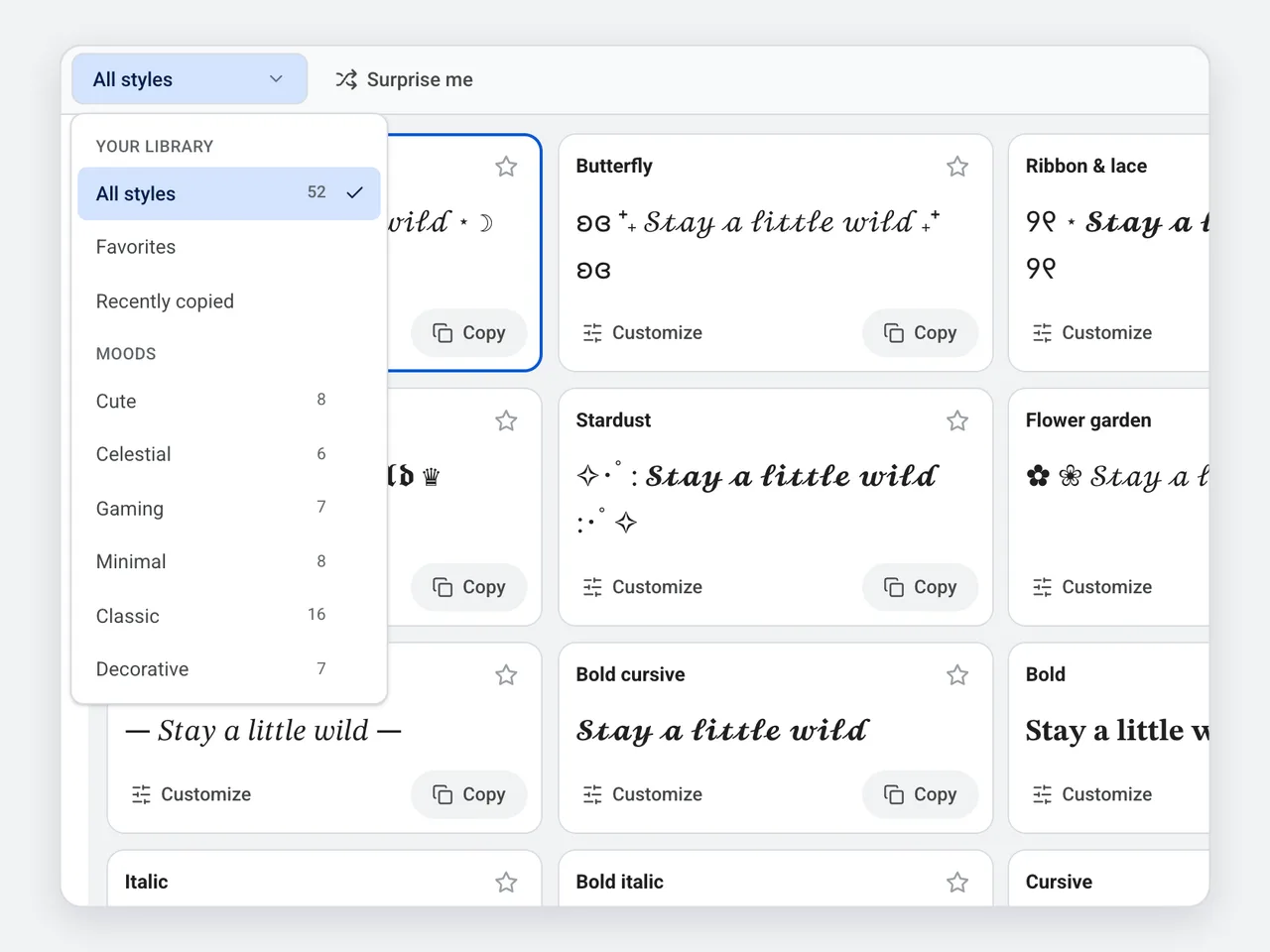
Six moods, plus your favorites and recent copies.
Browse 52 styles by mood
Filter the library by mood, or open Favorites and Recently copied. Each collection shows how many styles it holds, and the search box narrows them as you type. Press Surprise me when you want something new.
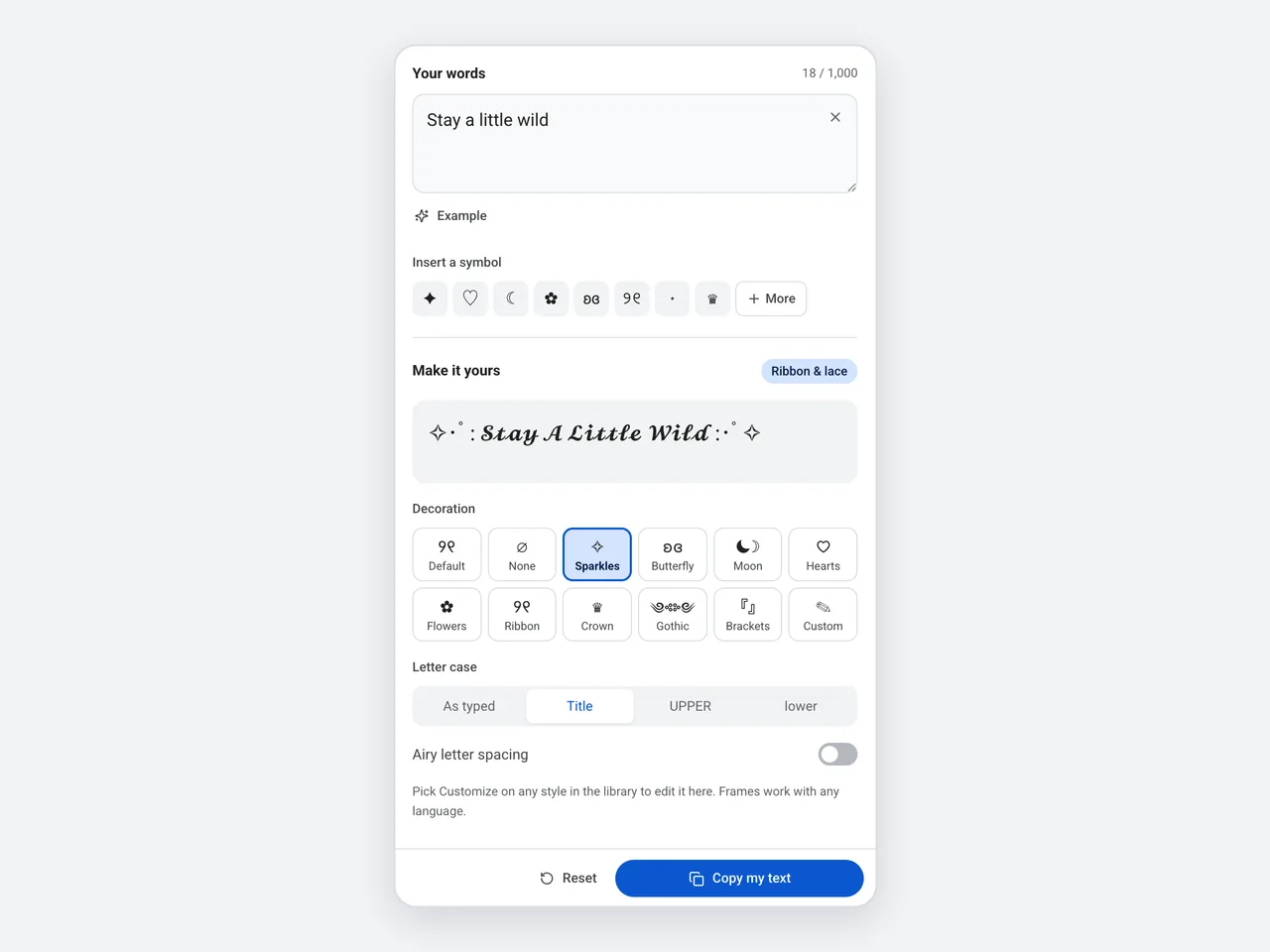
Ribbon & lace with a Sparkles frame and Title case.
Make any style your own
Select Customize on a style to edit it in the panel. Choose one of 9 frames or type your own, set the letter case and add spacing. The result updates instantly and Copy my text stays one click away.
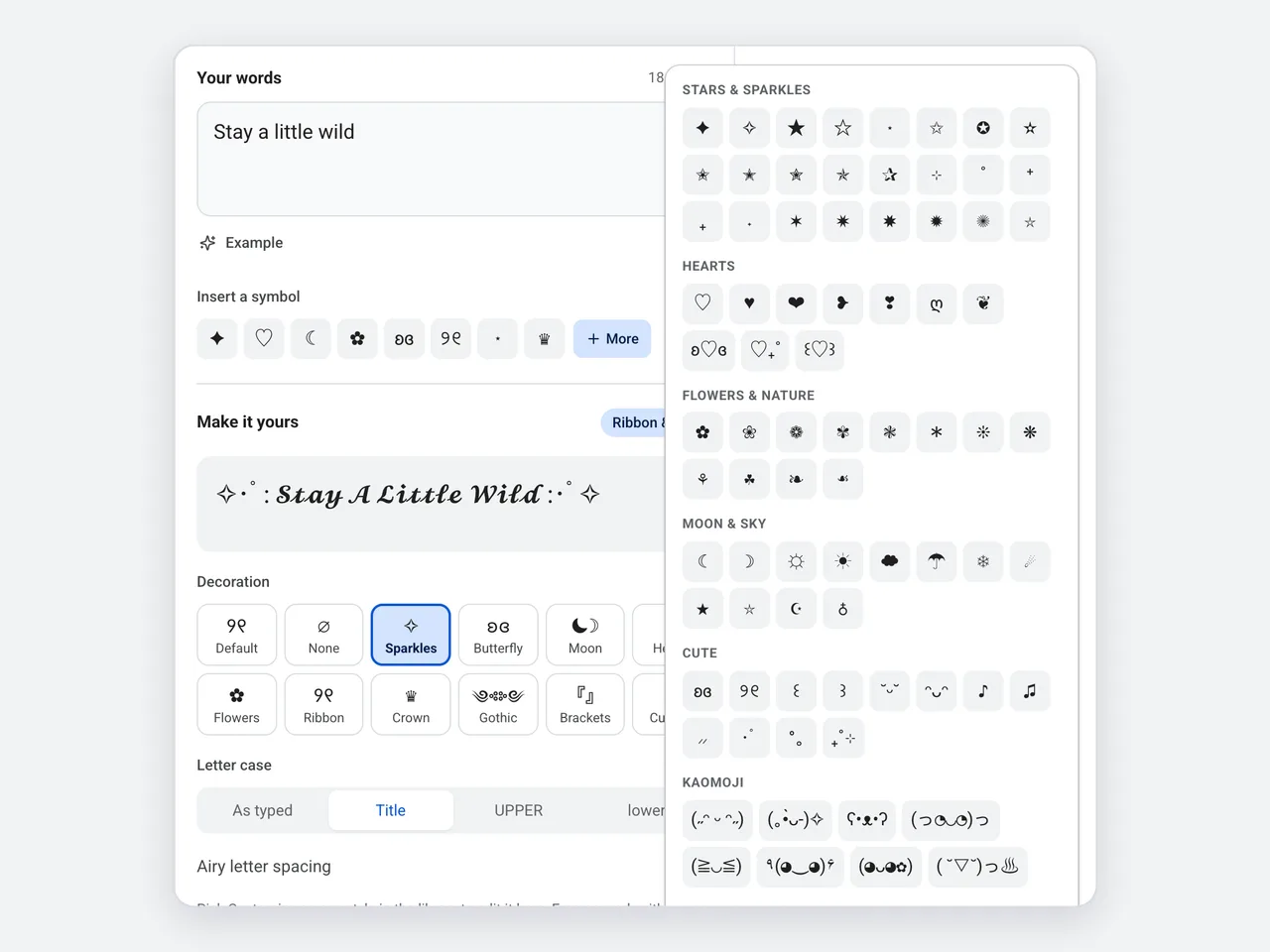
About 130 symbols in nine groups.
Symbols and kaomoji at your cursor
Eight favorites sit under the text box, and More opens the full picker: stars, hearts, flowers, moon and sky, arrows, brackets and kaomoji. Each one goes in exactly where your cursor is, and the picker stays open for several picks.
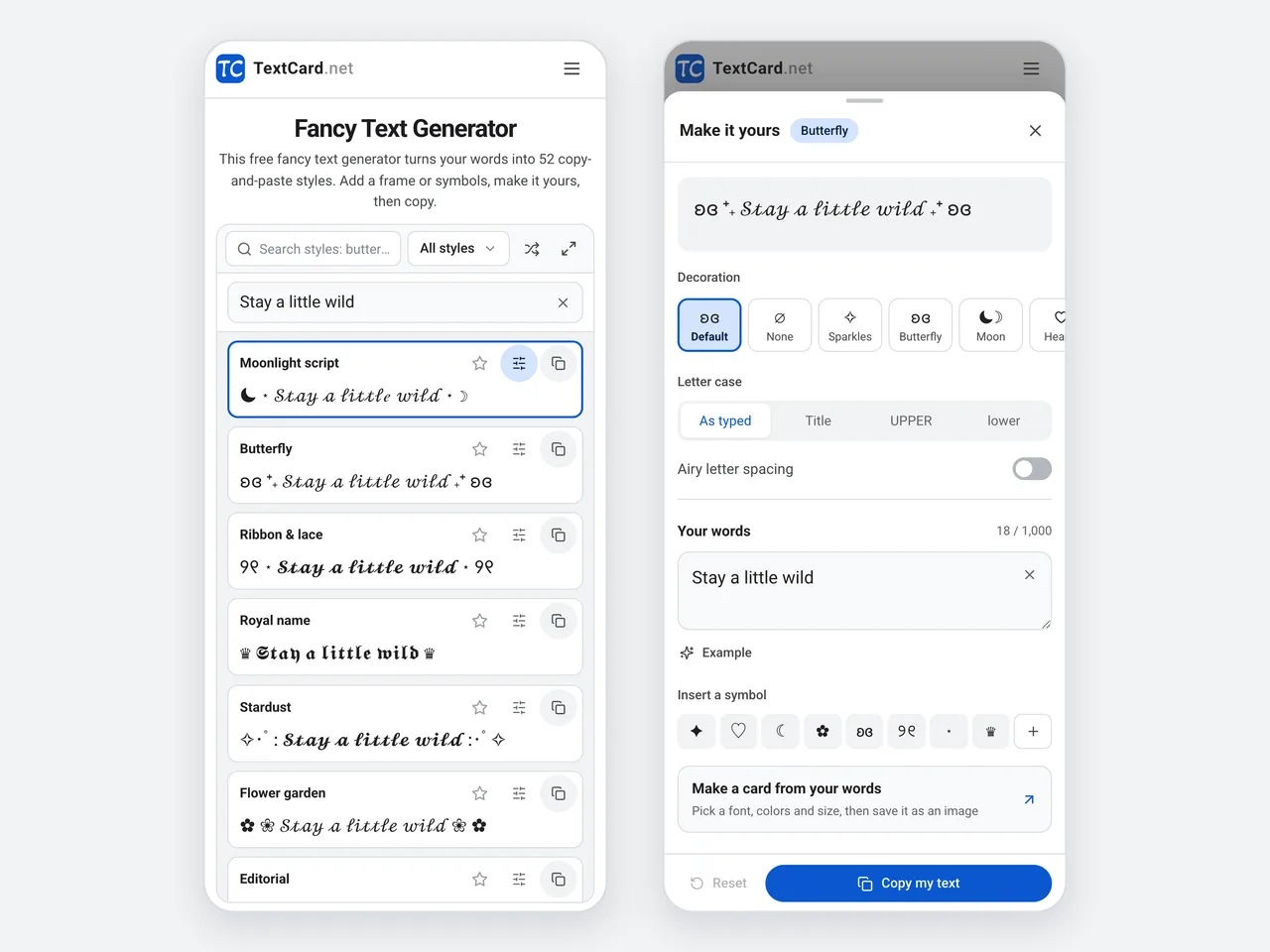
The library and the customize sheet on a 390-pixel-wide phone.
Made for your phone
On a phone the fancy text generator fits its toolbar on one row and shows about six styles per screen. Tap a preview to copy it, or tap the sliders to open a customize sheet with Copy my text pinned at the bottom.
Fancy text, a font file or an image?
A fancy text generator is the right choice when your words must stay text you can paste. Here is when another format works better.
Fancy text (Unicode)
Font file
Image card
Paste into bios and names
Yes, where special characters are allowed
No, fonts do not travel with copied text
No, it has to be uploaded as a picture
Looks the same everywhere
Mostly; it depends on the device’s fonts
Only where the font is installed
Yes, it is a picture
Search and screen readers
Often misread; keep key words plain
Read normally
Needs alt text
Letters and languages
Basic A–Z, a–z and some digits
Whatever the font covers
Any text in any language
Best for
Names, bios and short captions
Documents and design files
Quotes and shareable posts
Where to use fancy text
Short, personal text benefits the most. Here is where people use a fancy text generator, and the styles that suit each place.
Social bios and names
A cursive name or a framed tagline makes a profile feel personal. Try Moonlight script, Butterfly or Editorial.
Gaming nicknames
Royal name, Blade, Boss tag and Gothic stand out in nicknames and clan tags. Some games block special characters, so check first.
Captions and posts
Use bold or a simple frame for a heading or one key line, and keep the rest plain so it stays easy to read.
Chats and group names
Give a group name, status or quick message a heart frame, a little sparkle or a kaomoji.
Notes and planners
Sans bold and Double-struck make tidy headings in digital notes, to-do lists and study plans.
Greetings and gifts
Write a short wish in a cute style, or make an image card when the fonts and colors must be exact.
Tips for fancy text that reads well
A little style goes a long way. Keep your words readable wherever you share them.
Use one fancy style per line or name, and keep longer passages in plain text.
2
Letter styles convert basic English letters, and some convert numbers. Chinese, emoji and accented letters stay unchanged, but decorations work with any language.
3
Phones and apps draw Unicode differently. If you see empty boxes, try another style and check the result before you publish.
4
Screen readers may spell out decorative characters. Keep contact details, links and other key information in plain text.
5
Paste fancy text back into the fancy text generator and choose Plain letters to get ordinary letters again.
Copying, compatibility and privacy: the details that matter.
What is a fancy text generator?
A fancy text generator turns ordinary letters into look-alike Unicode characters, such as script, bold or gothic letters, that keep their style when you copy and paste them. This fancy text generator offers 52 styles, 9 frames and about 130 symbols, free in your browser.
Is this fancy text generator free?
Yes. It is free to use with no sign-up, no watermark and no limit on how often you copy. It runs in your browser, so there is nothing to install.
How do I copy fancy text?
Type your words into the fancy text generator, then click any style preview or its Copy button. To copy a style you have customized, use Copy my text in the customize panel. If your browser blocks clipboard access, the text is selected so you can copy it yourself.
Can I customize a style?
Yes. Select Customize on any style, then pick one of 9 ready-made frames or choose Custom to edit the symbols before and after your text. Letter case switches between as typed, Title, UPPER and lower before the style is applied, and airy letter spacing separates whole characters, including emoji. Copy my text copies the customized result; a library card copies its original preset.
Where can I paste fancy text?
Most social bios, captions, comments, chats and display names accept it, including on Instagram, TikTok, Discord and X. Some username fields allow only plain letters, and apps can show characters differently, so paste and check before you publish.
Is fancy text a font?
No. A fancy text generator does not install or change fonts. It replaces letters with different Unicode characters, so the style travels with the copied text. The device that shows it still chooses the font that draws those characters.
Does it work with Chinese, emoji and accented letters?
Letter styles convert the basic English letters A–Z and a–z, and some styles also convert digits. Chinese, emoji, accented letters and other characters stay as they are. Decorations and symbols work around text in any language.
Why do some characters appear as boxes?
The device or app showing your text may not have a glyph for that Unicode character. Try another style, keep the important words plain, or make an image card when the look must be exact.
Can I turn fancy text back into normal letters?
Yes. Paste it into the text box and choose Plain letters. Supported Unicode letters and underline or strikethrough effects become ordinary letters; frames and other characters stay. Capital-only styles cannot restore the original capitalization. Undo brings back your previous text.
What do Favorites and Recently copied save?
Only style names. Favorites keeps the styles you star, and Recently copied remembers the last eight styles you copied. Both stay in this browser without your text or custom frames, do not sync between devices, and disappear if you clear site data.
Does the fancy text generator work on my phone?
Yes. On a phone the toolbar fits on one row, the library shows about six styles per screen, and you tap a preview to copy it. Customize opens a sheet with every option, with Copy my text pinned at the bottom.
Is fancy text accessible?
Screen readers may read decorative characters letter by letter or skip them, and the text can be harder to search. Keep important information, such as contact details, in plain text and use fancy styles for short accents.
Is my text uploaded?
No. Your words are converted in your browser and are never sent to a server or stored. Copy sends the result to your clipboard, and Make a card passes your original text to the TextCard editor inside the page link.