One-click copy
Click any bold style, or its Copy button, and the bold text is on your clipboard with a confirmation.
This free bold text generator turns your words into 17 bold styles you can copy and paste: bold serif, bold sans, bold italic, bold cursive, bold bubbles and more.
Bold text is made of Unicode letters, so it stays bold wherever you paste it. Bold serif and Bold sans also turn numbers bold.
The classic bold, with bold numbers
𝐌𝐚𝐤𝐞 𝐢𝐭 𝐛𝐨𝐥𝐝
Clean and modern, with bold numbers
𝗠𝗮𝗸𝗲 𝗶𝘁 𝗯𝗼𝗹𝗱
𝑴𝒂𝒌𝒆 𝒊𝒕 𝒃𝒐𝒍𝒅
𝙈𝙖𝙠𝙚 𝙞𝙩 𝙗𝙤𝙡𝙙
𝓜𝓪𝓴𝓮 𝓲𝓽 𝓫𝓸𝓵𝓭
𝕸𝖆𝖐𝖊 𝖎𝖙 𝖇𝖔𝖑𝖉
Outlined “blackboard” letters
𝕄𝕒𝕜𝕖 𝕚𝕥 𝕓𝕠𝕝𝕕
Capitals only, white on black
🅼🅰🅺🅴 🅸🆃 🅱🅾🅻🅳
Bold gothic with crowns
♛ 𝕸𝖆𝖐𝖊 𝖎𝖙 𝖇𝖔𝖑𝖉 ♛
Bold serif between suns
☀︎ ─ 𝐌𝐚𝐤𝐞 𝐢𝐭 𝐛𝐨𝐥𝐝 ─ ☀︎
Capitals and numbers in black circles
🅜🅐🅚🅔 🅘🅣 🅑🅞🅛🅓
Wide bold sans for headings
𝗠 𝗮 𝗸 𝗲 𝗶 𝘁 𝗯 𝗼 𝗹 𝗱
Heavy brackets around bold sans
【 𝗠𝗮𝗸𝗲 𝗶𝘁 𝗯𝗼𝗹𝗱 】
Bold cursive with tiny stars
⋆˙⟡ 𝓜𝓪𝓴𝓮 𝓲𝓽 𝓫𝓸𝓵𝓭 ⟡˙⋆
Fast italic bold between bolts
ϟ 𝙈𝙖𝙠𝙚 𝙞𝙩 𝙗𝙤𝙡𝙙 ϟ
Bold italic in curly quote marks
❝ 𝑴𝒂𝒌𝒆 𝒊𝒕 𝒃𝒐𝒍𝒅 ❞
Bold serif with an arrow, for lists
➤ 𝐌𝐚𝐤𝐞 𝐢𝐭 𝐛𝐨𝐥𝐝
A bold text generator swaps ordinary letters for bold look-alike characters from Unicode’s Mathematical Alphanumeric Symbols block. Because the bold is in the characters themselves, the text stays bold in bios, captions and messages that have no formatting buttons.

Bold that travels. Copy and paste the result anywhere that accepts Unicode text. There is no formatting to lose and no font to install.
17 bold styles. Bold serif, bold sans, bold italic, bold sans italic, bold cursive, bold gothic, double-struck, bold blocks and bold bubbles, plus spaced, quoted, sparkle, lightning, crown and other framed styles.
Bold numbers too. Bold serif, bold sans and bold bubbles also turn digits bold — 𝟐𝟎𝟐𝟔 — which is handy for prices, dates and scores.
Private and instant. The bold text generator runs in your browser. Your words are converted as you type and are never uploaded.
A bold text generator changes the characters, not the formatting, so the bold survives copy and paste.
Bold serif𝐁𝐢𝐠 𝐧𝐞𝐰𝐬 𝐭𝐨𝐝𝐚𝐲
Bold sans𝗕𝗶𝗴 𝗻𝗲𝘄𝘀 𝘁𝗼𝗱𝗮𝘆
Bold italic𝑩𝒊𝒈 𝒏𝒆𝒘𝒔 𝒕𝒐𝒅𝒂𝒚
Bold cursive𝓑𝓲𝓰 𝓷𝓮𝔀𝓼 𝓽𝓸𝓭𝓪𝔂
Every letter the bold text generator uses, capital and lowercase, next to the plain letter. The digits row shows the bold numbers.
| Letter | Bold serif | Bold sans | Bold italic | Bold cursive |
|---|---|---|---|---|
| A a | 𝐀 𝐚 | 𝗔 𝗮 | 𝑨 𝒂 | 𝓐 𝓪 |
| B b | 𝐁 𝐛 | 𝗕 𝗯 | 𝑩 𝒃 | 𝓑 𝓫 |
| C c | 𝐂 𝐜 | 𝗖 𝗰 | 𝑪 𝒄 | 𝓒 𝓬 |
| D d | 𝐃 𝐝 | 𝗗 𝗱 | 𝑫 𝒅 | 𝓓 𝓭 |
| E e | 𝐄 𝐞 | 𝗘 𝗲 | 𝑬 𝒆 | 𝓔 𝓮 |
| F f | 𝐅 𝐟 | 𝗙 𝗳 | 𝑭 𝒇 | 𝓕 𝓯 |
| G g | 𝐆 𝐠 | 𝗚 𝗴 | 𝑮 𝒈 | 𝓖 𝓰 |
| H h | 𝐇 𝐡 | 𝗛 𝗵 | 𝑯 𝒉 | 𝓗 𝓱 |
| I i | 𝐈 𝐢 | 𝗜 𝗶 | 𝑰 𝒊 | 𝓘 𝓲 |
| J j | 𝐉 𝐣 | 𝗝 𝗷 | 𝑱 𝒋 | 𝓙 𝓳 |
| K k | 𝐊 𝐤 | 𝗞 𝗸 | 𝑲 𝒌 | 𝓚 𝓴 |
| L l | 𝐋 𝐥 | 𝗟 𝗹 | 𝑳 𝒍 | 𝓛 𝓵 |
| M m | 𝐌 𝐦 | 𝗠 𝗺 | 𝑴 𝒎 | 𝓜 𝓶 |
| Letter | Bold serif | Bold sans | Bold italic | Bold cursive |
|---|---|---|---|---|
| N n | 𝐍 𝐧 | 𝗡 𝗻 | 𝑵 𝒏 | 𝓝 𝓷 |
| O o | 𝐎 𝐨 | 𝗢 𝗼 | 𝑶 𝒐 | 𝓞 𝓸 |
| P p | 𝐏 𝐩 | 𝗣 𝗽 | 𝑷 𝒑 | 𝓟 𝓹 |
| Q q | 𝐐 𝐪 | 𝗤 𝗾 | 𝑸 𝒒 | 𝓠 𝓺 |
| R r | 𝐑 𝐫 | 𝗥 𝗿 | 𝑹 𝒓 | 𝓡 𝓻 |
| S s | 𝐒 𝐬 | 𝗦 𝘀 | 𝑺 𝒔 | 𝓢 𝓼 |
| T t | 𝐓 𝐭 | 𝗧 𝘁 | 𝑻 𝒕 | 𝓣 𝓽 |
| U u | 𝐔 𝐮 | 𝗨 𝘂 | 𝑼 𝒖 | 𝓤 𝓾 |
| V v | 𝐕 𝐯 | 𝗩 𝘃 | 𝑽 𝒗 | 𝓥 𝓿 |
| W w | 𝐖 𝐰 | 𝗪 𝘄 | 𝑾 𝒘 | 𝓦 𝔀 |
| X x | 𝐗 𝐱 | 𝗫 𝘅 | 𝑿 𝒙 | 𝓧 𝔁 |
| Y y | 𝐘 𝐲 | 𝗬 𝘆 | 𝒀 𝒚 | 𝓨 𝔂 |
| Z z | 𝐙 𝐳 | 𝗭 𝘇 | 𝒁 𝒛 | 𝓩 𝔃 |
| Bold serif digits | 𝟎𝟏𝟐𝟑𝟒𝟓𝟔𝟕𝟖𝟗 |
|---|---|
| Bold sans digits | 𝟬𝟭𝟮𝟯𝟰𝟱𝟲𝟳𝟴𝟵 |
Fast to use on any device, with the details that make bold text look right.
Click any bold style, or its Copy button, and the bold text is on your clipboard with a confirmation.
From a classic bold serif to bold gothic, black bubble letters and framed headline styles, all side by side.
Switch to Title, UPPER or lower before the bold is applied, so a headline comes out in clean bold capitals.
Bold serif, bold sans and double-struck have their own digits 0–9 for prices, dates and scores.
Paste bold text into the box and press Plain letters to turn it into normal letters you can edit.
Need real fonts, colors and layout? Send your words to the card maker and download an image.
Bold a single word or a whole caption: the bold text generator handles up to 1,000 characters at a time.
On a phone, the text box sits above the styles and a tap on any preview copies it.
No sign-up, no watermark and no limit. Your words never leave your browser.
Bold words in three steps, with no sign-up.
Type or paste the words you want in bold. Every bold style in the bold text generator updates as you type.
Compare the 17 styles side by side, and set the letter case if you want Title or UPPER.
Click a style or its Copy button, then paste the bold text into your bio, post, comment or message.
Real screenshots of the tool, on a laptop and on a phone.
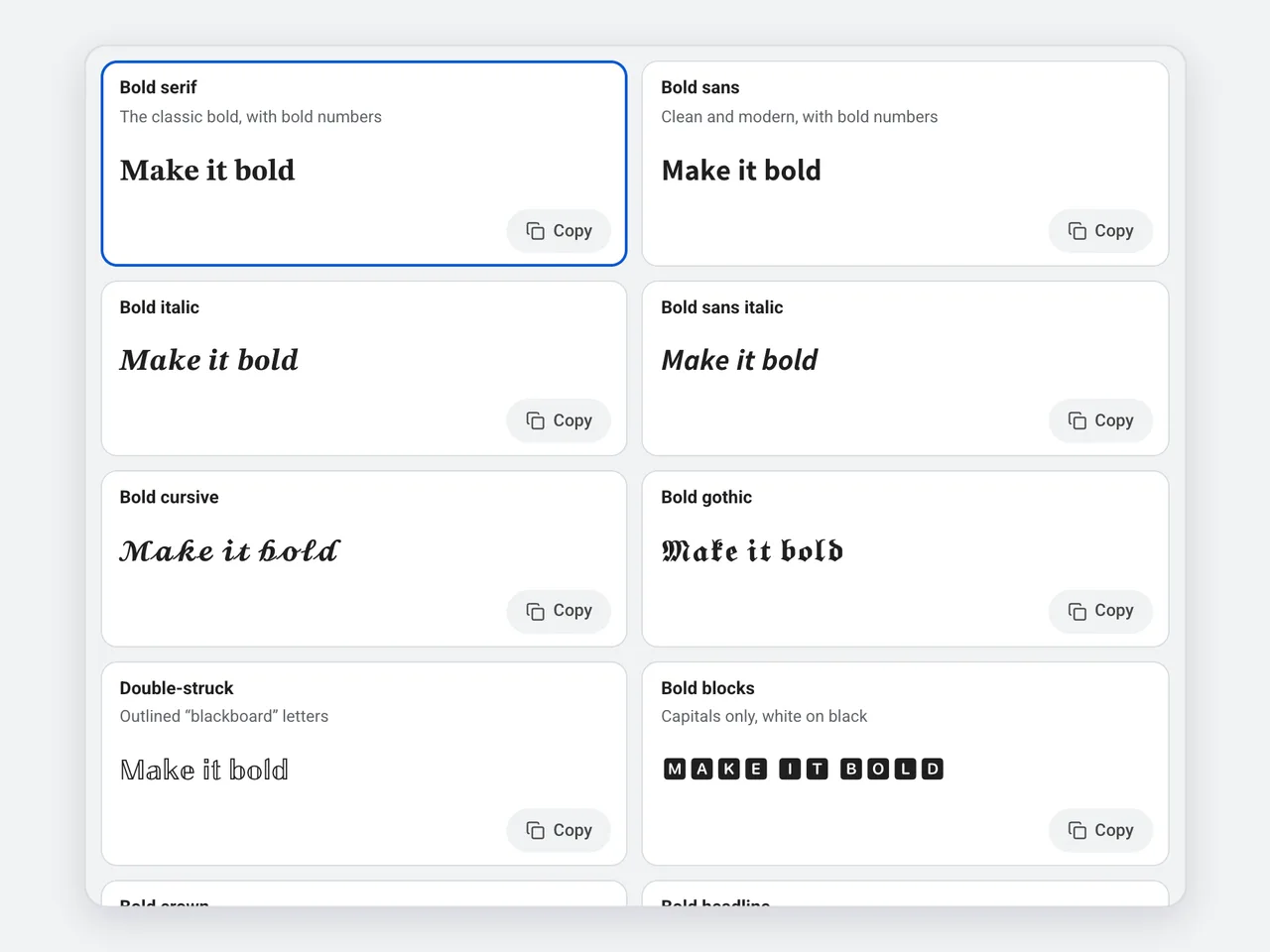
The panel shows your words in all 17 bold styles at once. Click any card to copy it; the style you picked also appears in the Result box with a large Copy button.
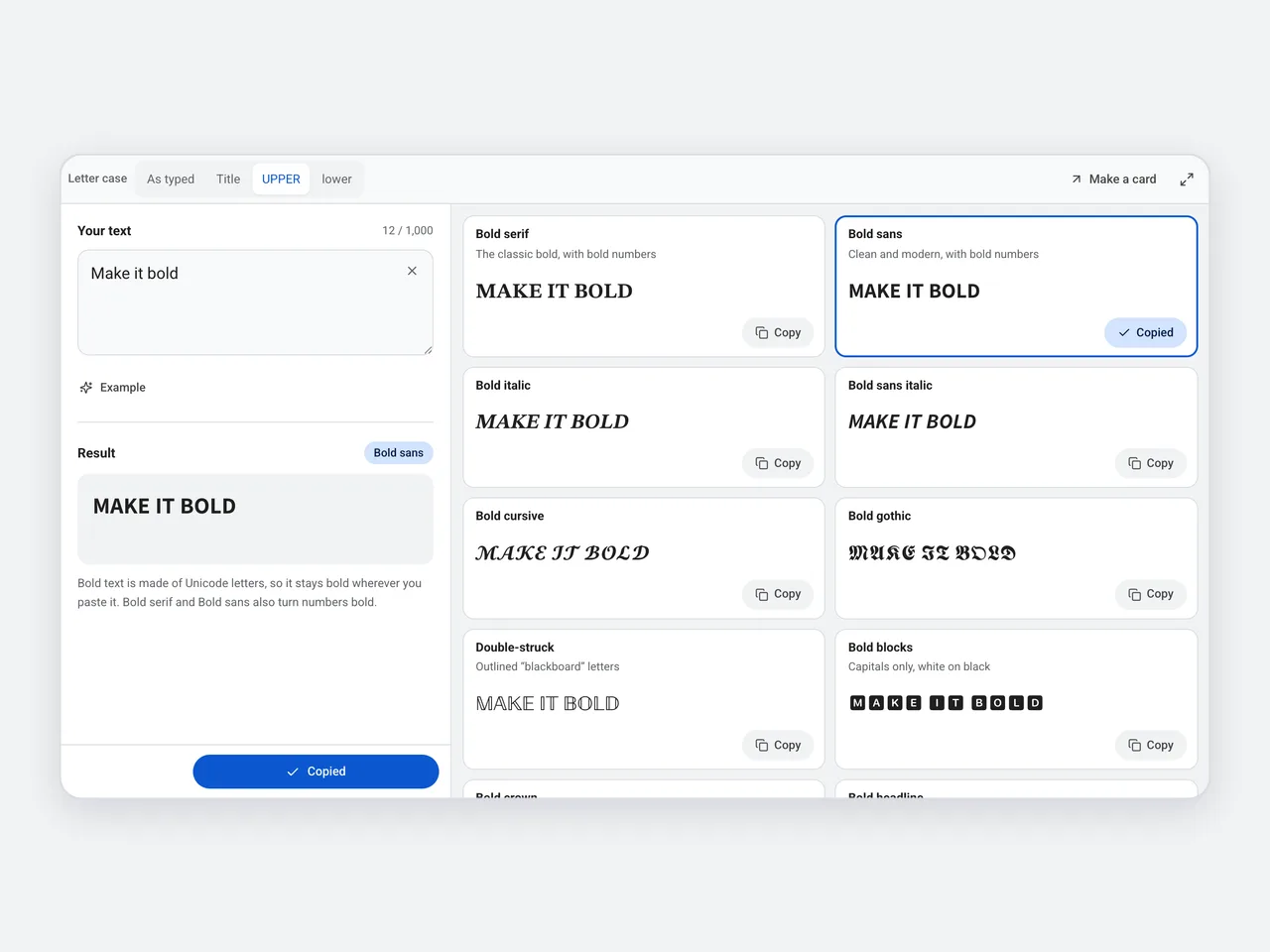
Set letter case to UPPER and every style switches to bold capitals — the quickest way to make a bold heading for a post or a profile section.
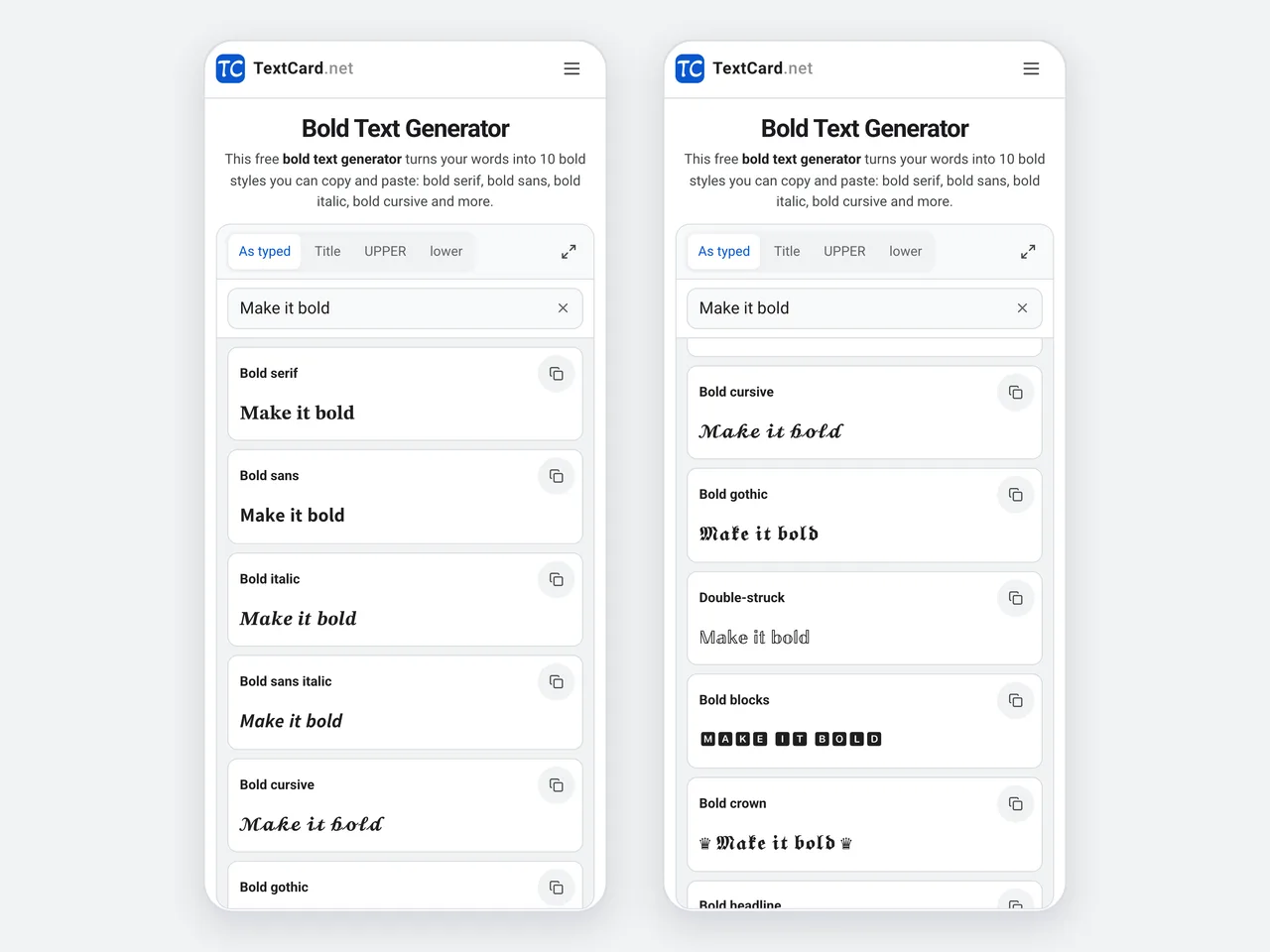
On a phone, the text box sits above the styles. Type once, tap a preview to copy it, and paste the bold text straight into another app.
A bold text generator is not the only way to make text bold. Here is when each one fits.
| Unicode bold text | Bold formatting (Ctrl+B) | Bold text image | |
|---|---|---|---|
| Works in bios and names | Yes, where special characters are allowed | No, most bios have no formatting | No, it is a picture |
| Survives copy and paste | Yes, the bold is in the characters | Only between apps that keep formatting | Not as text |
| Search and screen readers | Often misread; keep key words plain | Read normally | Needs alt text |
| Languages | Basic A–Z, a–z and digits | Any language | Any language |
| Best for | Short emphasis in social posts | Documents and emails | Quotes and graphics |
Bold works best on a few words. Here is where a bold text generator helps most.
A bold name or a bold one-line bio stands out in a list of plain profiles.
Start a long caption with a bold first line, so readers see the point before the “more” cut.
Bold the label of each point in a thread or a caption so people can scan it quickly.
Bold serif and bold sans have bold digits, ideal for a price, a date or a score.
Bold one word to stress it in a comment box that has no formatting buttons.
Bold gothic and Bold crown give nicknames and clan tags a strong look, where the game allows special characters.
A little bold goes a long way. Keep your words easy to read wherever you paste them.
Bold a few words, not whole paragraphs: long runs of bold Unicode text are tiring to read and harder to search.
Bold serif and bold sans are the most widely supported bold styles. Check unusual styles on the devices your readers use.
Unicode bold covers only the basic letters A–Z, a–z and the digits. Accented letters, Chinese and emoji stay as they are.
Screen readers may read bold Unicode letters one by one, so keep links, names and contact details in plain text.
Paste bold text back into the bold text generator and press Plain letters to edit it again.
Copying, compatibility and privacy: the details that matter.
A bold text generator converts normal letters into bold Unicode characters that you can copy and paste. This bold text generator offers 17 bold styles, including bold serif, bold sans, bold italic, bold cursive and bold bubbles, free in your browser.
Type your words into the bold text generator, copy a bold style and paste it. The bold is part of the characters, so it shows up even in bios, names and comments without formatting options.
No. Unicode bold letters are separate characters, not a font. Your phone or computer still draws them with its own fonts, which is why they can look slightly different on each device.
Yes. Bold serif, bold sans and double-struck have their own bold digits 0–9. The other bold styles keep plain numbers.
Most bios, captions, posts, comments and chat messages accept it, including on Instagram, X, TikTok, Facebook and Discord. Some name fields allow only plain letters, so paste and check before you save.
The device or app showing it has no glyph for that character. Bold serif and bold sans display almost everywhere; switch to one of them if another style shows boxes.
Yes. Generate the bold version of the words you want, then paste them between plain words. Mixing bold and plain words is the most readable way to use bold text.
Unicode has bold forms only for the basic Latin letters A–Z and a–z and the digits. Accented letters, other alphabets, Chinese and emoji stay unchanged.
Screen readers may spell bold Unicode letters out or skip them, and search may not match them to normal words. Use bold text for short emphasis and keep the important words plain.
Yes. Paste it into the bold text generator and press Plain letters. Bold letters become normal letters you can edit, with Undo if you change your mind.
Yes. The bold text generator is free with no sign-up, no watermark and no limit. It runs in your browser, so your text is never uploaded.
17 bold styles, bold numbers and one-click copy. Free, private and ready to paste.
Open the bold text generator17 styles · Free · No sign-up · Runs in your browser, your text is never uploaded