11 small styles
Superscript, tiny lowercase, small caps and subscript, plus framed tiny text (sparkle, whisper, hearts, dotted) and small caps labels and headings, side by side.
This free small text generator makes ᵗⁱⁿʸ superscript, ꜱᴍᴀʟʟ ᴄᴀᴘꜱ and ₛᵤbₛcᵣᵢₚₜ text from your words, ready to copy and paste.
Superscript and small caps cover every letter. Subscript exists for only 17 letters, so b c d f g q w y z stay normal size.
Raised tiny letters and numbers
ᵀⁱⁿʸ ᵀᵉˣᵗ
All lowercase superscript, the most even look
ᵗⁱⁿʸ ᵗᵉˣᵗ
Capital shapes at lowercase height
ᴛɪɴʏ ᴛᴇxᴛ
Lowered letters; b c d f g q w y z stay normal size
ₜᵢₙy ₜₑₓₜ
Superscript with a little frame
⋆˙ ᵗⁱⁿʸ ᵗᵉˣᵗ ˙⋆
Airy small caps for headings
ᴛ ɪ ɴ ʏ ᴛ ᴇ x ᴛ
Superscript in tiny brackets, like an aside
⁽ ᵗⁱⁿʸ ᵗᵉˣᵗ ⁾
Little letters between hearts
♡ ᵗⁱⁿʸ ᵗᵉˣᵗ ♡
Superscript letters joined by raised dots
ᵗ˙ⁱ˙ⁿ˙ʸ ᵗ˙ᵉ˙ˣ˙ᵗ
Small caps in corner brackets
『 ᴛɪɴʏ ᴛᴇxᴛ 』
Small caps between rules, for section titles
── ᴛɪɴʏ ᴛᴇxᴛ ──
A small text generator swaps ordinary letters for small Unicode characters: superscript letters that sit high, like ᵗʰⁱˢ, small capitals like ᴛʜɪꜱ, and subscript letters that sit low. They are characters, not formatting, so small text stays small when you copy and paste it.

Three kinds of small. Superscript, small caps and subscript, plus tiny lowercase, a framed tiny style and spaced small caps.
Honest about the gaps. Unicode has no subscript for b, c, d, f, g, q, w, y, z, so those letters stay normal size instead of being faked.
Tiny numbers too. Superscript and subscript include the digits 0–9 and + − = ( ), handy for footnotes and formulas.
Private. The small text generator runs in your browser. Nothing you type is uploaded.
The small text generator replaces each letter with a smaller Unicode character, so the size travels with the text.
Superscriptˢᵉᵉ ʸᵒᵘ ˢᵒᵒⁿ
Small capsꜱᴇᴇ ʏᴏᴜ ꜱᴏᴏɴ
Subscriptₛₑₑ yₒᵤ ₛₒₒₙ
Tiny sparkle⋆˙ ˢᵉᵉ ʸᵒᵘ ˢᵒᵒⁿ ˙⋆
Every small letter the small text generator uses. A dash means Unicode has no small form for that letter. Superscript q is a look-alike, and the small caps x is the ordinary x, which is already small.
| Letter | Superscript | Small caps | Subscript |
|---|---|---|---|
| a | ᵃ | ᴀ | ₐ |
| b | ᵇ | ʙ | — |
| c | ᶜ | ᴄ | — |
| d | ᵈ | ᴅ | — |
| e | ᵉ | ᴇ | ₑ |
| f | ᶠ | ꜰ | — |
| g | ᵍ | ɢ | — |
| h | ʰ | ʜ | ₕ |
| i | ⁱ | ɪ | ᵢ |
| j | ʲ | ᴊ | ⱼ |
| k | ᵏ | ᴋ | ₖ |
| l | ˡ | ʟ | ₗ |
| m | ᵐ | ᴍ | ₘ |
| Letter | Superscript | Small caps | Subscript |
|---|---|---|---|
| n | ⁿ | ɴ | ₙ |
| o | ᵒ | ᴏ | ₒ |
| p | ᵖ | ᴘ | ₚ |
| q | ᑫ | ǫ | — |
| r | ʳ | ʀ | ᵣ |
| s | ˢ | ꜱ | ₛ |
| t | ᵗ | ᴛ | ₜ |
| u | ᵘ | ᴜ | ᵤ |
| v | ᵛ | ᴠ | ᵥ |
| w | ʷ | ᴡ | — |
| x | ˣ | x | ₓ |
| y | ʸ | ʏ | — |
| z | ᶻ | ᴢ | — |
| Superscript digits | ⁰¹²³⁴⁵⁶⁷⁸⁹ |
|---|---|
| Subscript digits | ₀₁₂₃₄₅₆₇₈₉ |
Three kinds of small text, done properly, with one-click copy.
Superscript, tiny lowercase, small caps and subscript, plus framed tiny text (sparkle, whisper, hearts, dotted) and small caps labels and headings, side by side.
Click any style or its Copy button and the small text is on your clipboard.
Superscript ⁰¹²³ and subscript ₀₁₂₃ digits, plus + − = ( ) for x², 10⁶ or H₂O.
Switch between as typed, Title, UPPER and lower before the small letters are applied.
Letters with no subscript form stay at normal size, and every card says what its style covers.
Want small type in a design instead? Send your words to the card maker and pick any font size.
Shrink one word or a whole caption: the small text generator handles up to 1,000 characters.
On a phone, type in the slim box at the top and tap a preview to copy it.
No sign-up and no limits. The small text generator never uploads your words.
Tiny text in three steps.
Type the words you want to shrink. Every small text style updates as you type.
Superscript is the smallest, small caps is the most readable, and subscript sits low.
Click a style or press Copy, then paste the small text into your bio, name or caption.
Real screenshots of the tool, on a laptop and on a phone.
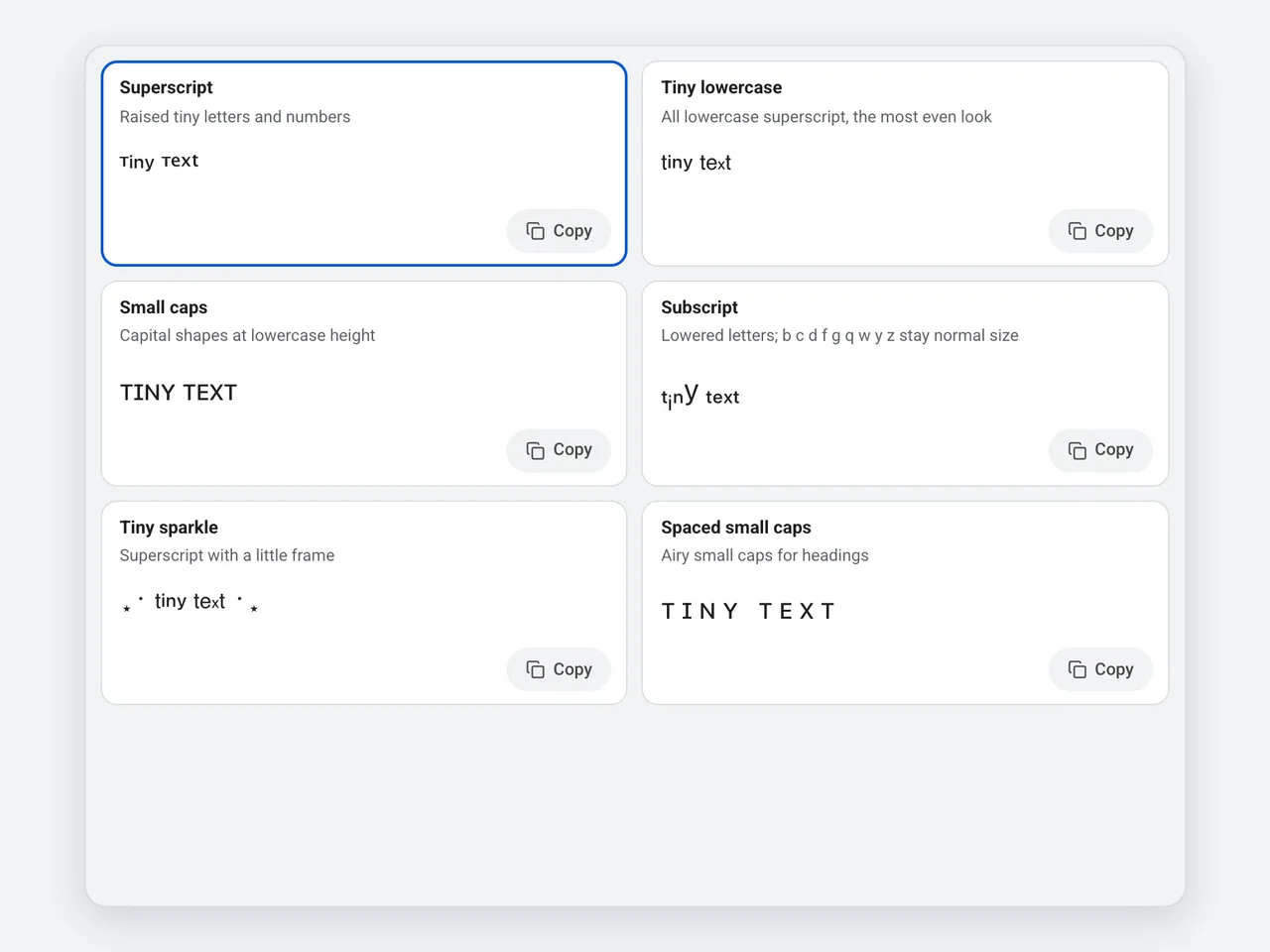
Superscript, tiny lowercase, small caps, subscript, tiny sparkle and spaced small caps update together. Click a card to copy it, or use the big Copy button under the result.
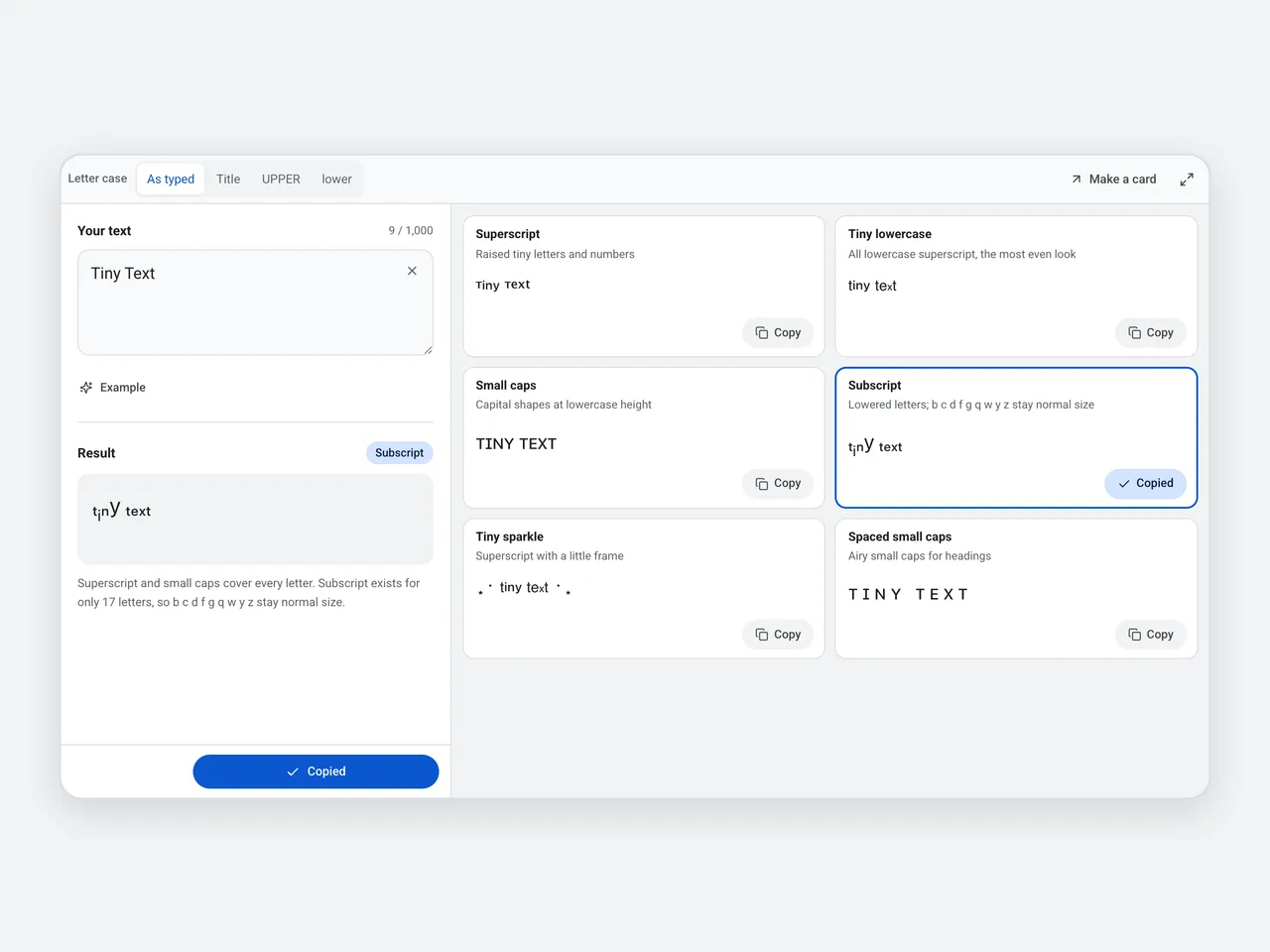
Unicode has subscript forms for only 17 Latin letters. The small text generator leaves the other nine at normal size, and the note on the card says so.
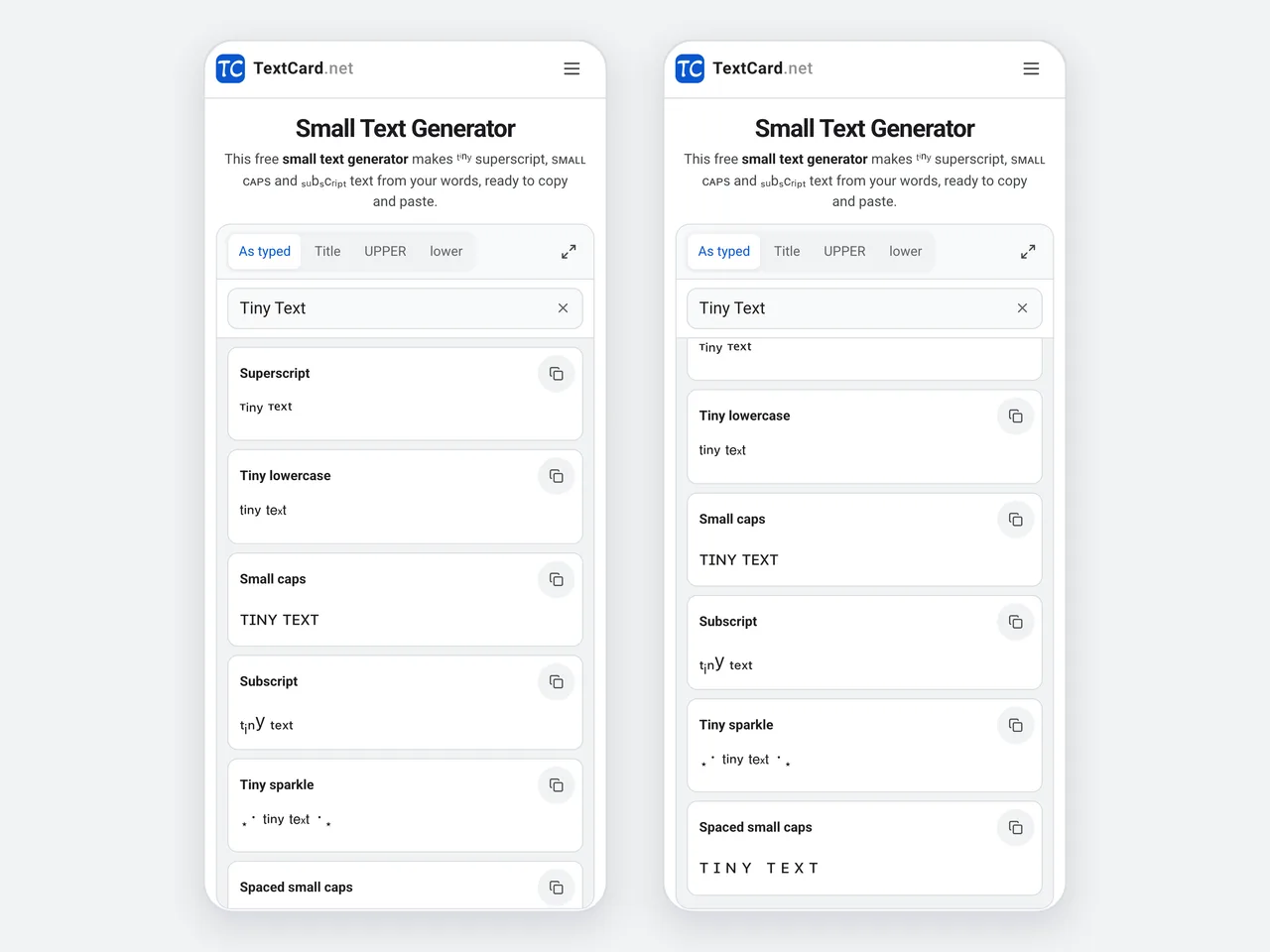
Type once in the slim box at the top and tap any preview to copy it. The small text is ready to paste into another app.
The three kinds of small text look and work differently. Here is how to choose.
| Superscript | Small caps | Subscript | |
|---|---|---|---|
| Example | ᵗⁱⁿʸ ᵗᵉˣᵗ | ᴛɪɴʏ ᴛᴇxᴛ | ₜᵢₙy ₜₑₓₜ |
| Size and position | Smallest; sits high, like an exponent | Lowercase height, capital shapes | Small; sits low, like in H₂O |
| Letters covered | All 26 (q is a look-alike) | All 26 (x stays x, q is a look-alike) | 17; b c d f g q w y z stay normal |
| Digits | 0–9 and + − = ( ) | Plain digits | 0–9 and + − = ( ) |
| Best for | Tiny captions and cute bios | Readable small headings | Formulas and footnotes |
Small text is a quiet accent. Here is where a small text generator helps most.
Tiny text under a name, or a small caps tagline, gives a profile a clean, quiet look.
Add a tiny aside or a whisper-quiet joke at the end of a caption.
Write x², H₂O or a footnote mark¹ in chat apps that have no superscript button.
Spaced small caps make neat section headings in notes and posts.
Tiny sparkle and tiny lowercase suit soft, minimal aesthetics.
Small caps nicknames look tidy in games and chats that accept special characters.
Small text should stay legible. Keep these points in mind.
Small caps is the most readable small text; use superscript for short accents.
Avoid subscript for words with b, c, d, f, g, q, w, y, z: those letters stay full size and look uneven.
Tiny lowercase gives the most even superscript, because several capital letters have no superscript form.
Small text is harder to read on small screens, so keep important details at normal size.
Screen readers may read small Unicode letters oddly. Keep links and contact details in plain text.
Copying, compatibility and privacy: the details that matter.
A small text generator turns normal letters into small Unicode characters you can copy and paste: superscript, small caps and subscript. This small text generator offers 11 small text styles, free in your browser.
Type your words into the small text generator, pick a style and press Copy. Then paste the small text wherever you want it.
Superscript letters are usually the smallest, followed by subscript. Small caps are the height of a lowercase letter but easier to read.
Unicode includes subscript forms for only 17 Latin letters: a, e, h, i, j, k, l, m, n, o, p, r, s, t, u, v and x. The small text generator leaves the other letters at normal size rather than replacing them with look-alikes.
Most fonts have no superscript q, so the small text generator uses a similar-looking character. A true superscript q was added to Unicode only in 2021, and few fonts include it yet.
Yes. Superscript and subscript include all ten digits and the signs + − = ( ), so you can write x², 10⁶ or H₂O.
Most bios, captions, comments and chats accept small text, including Instagram, TikTok, X and Discord. Some name fields allow only plain letters, so check before you save.
No. A small font size is formatting that disappears when you paste. Small text is made of special characters, so it stays small without any formatting.
The device or app has no glyph for some of the characters. Small caps and superscript digits are widely supported; try those if another style shows boxes.
Yes. The small text generator is free with no sign-up, and it runs in your browser, so your text is never uploaded.
Superscript, small caps and subscript in one place, with one-click copy.
Open the small text generator11 styles · Free · No sign-up · Runs in your browser, your text is never uploaded